
- Existing numbers
- Desktop & mobile
- Blasts & reminders
Stay connected with your customers by text. Customers would often rather text than call. Text-enable your existing business numbers and manage every conversation through an intuitive portal you reach with your phone system login, on desktop or on the mobile app.
Keyword responders, appointment reminders, message blasts, and drip campaigns help you communicate better and faster with customers and prospects.
See business texting in action
A short video on how texting can modernize your business, from real-time conversations to reminders, blasts, and faster customer service.
One inbox for every text conversation
Conversations, contacts, canned responses, drip campaigns, blasts, and reminders, all in one place on desktop, with the same inbox on the iOS and Android app.
- Works with your existing phone numbers
- Managed through your phone system login
- Mobile app for iOS and Android
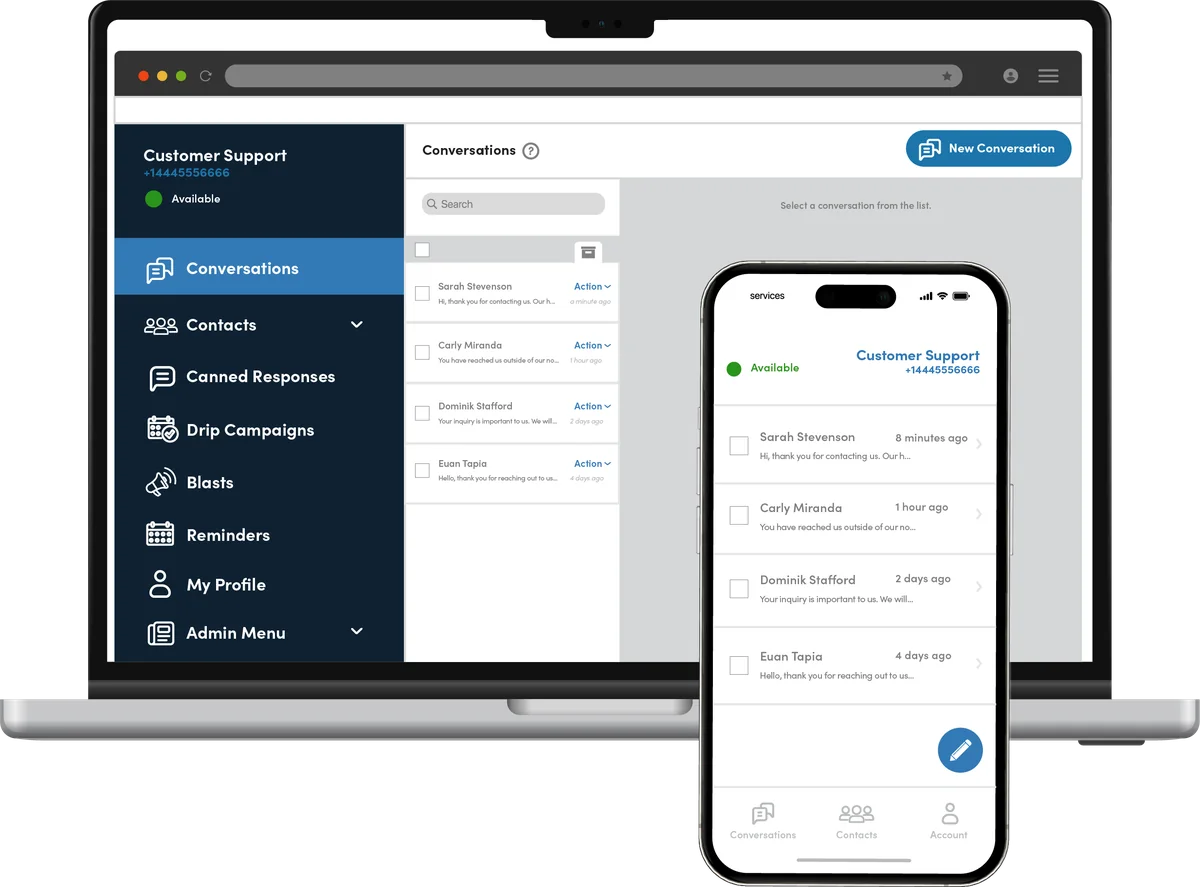
A complete business texting platform
Message blasts
Reach a large number of contacts with a single message, including urgent updates.
Reminders
Send automated appointment and pickup reminders.
Drip campaigns
Send automated, time-released messages.
Number sharing
Access multiple numbers from a single login, and see which teammate is handling each conversation.
Conversation history
See the full history of every text thread.
Multi-device sync & MMS
Use your account on multiple devices, and send and receive pictures and media.
Address book
Separate and sync contacts across devices.
Keyword auto-replies
Send automatic replies to keyword texts, with a built-in QR code generator.
Canned & away responses
Answer common questions consistently, and set an away message when you step out.
How businesses use texting
No matter what business you’re in, texting helps you communicate faster and drive growth.
Real estate
- Send property details, flyers, and listing info with keyword responders
- Boost open-house attendance and cut showing no-shows with reminders
- Text new listings to prospects
Auto dealerships
- Send sales details and contacts with keyword responders
- Service appointment reminders and completion notices
- Inventory, trade-in, and sales announcements
Healthcare
- Announce availability or service locations
- Appointment and prescription pickup reminders
- Drip campaigns to collect updated information
Integrations
Real-time integrations with CRMs, reservation systems, and other tools, and the list keeps growing.
- HubSpot
- Microsoft Teams
- Slack
- Pipedrive
- Google Chat
- Webhooks
Product names are trademarks of their respective owners.
Up and running without the headache
We review your setup
A UC Specialist looks at your current service, your bills, and how calls move through your office.
We build it and port your numbers
We configure everything, set up your devices and apps, and schedule the number port so callers never notice the switch.
Go live with 24/7 support
We train your team and stay on call around the clock, with AI agents answering after hours.
Who it’s for
Built for offices where every call matters, anywhere in the U.S.
Pairs well with
Frequently asked questions
Can I text from my current business number?
In most cases, yes. Texting works with your existing phone numbers, or we can add a dedicated SMS line.
Can several people share one texting number?
Yes. Number sharing lets your team use the same number, and everyone can see who is handling each conversation.
Do users need their own phone number?
No. Accounts can be a user with a number, a user without a number, or a number only that teammates share.
Can I send appointment reminders and campaigns?
Yes. Schedule reminders, message blasts, and drip campaigns.
Does it integrate with other apps?
Yes. Real-time integrations include HubSpot, Microsoft Teams, Slack, Pipedrive, Google Chat, webhooks, and more.
Are there rules for business texting?
Yes. Business texting must follow carrier registration and consent rules. We help you get set up the right way.
Get a quote built around your business.
No confusing packages and no paying for extras you won’t use. Talk to a UC Specialist, or send us a few details and we’ll follow up with a free telecom audit and a no-obligation quote.